Miscellaneous Software🔎
Installations🔎
ESMFold🔎
- Cuda Toolkit Info: https://anaconda.org/channels/nvidia/packages/cuda-toolkit/overview
- Git repo: https://github.com/facebookresearch/ESM
- Pytorch: https://pytorch.org/get-started/locally/
This one was a PITA. I was facing similar issues to this GitHub issues report and wound up having to do some archeological digging into the specific version of openfold to hammer down the dependencies. The yaml file (environment.yaml) I found with:
(esmfold-env) [lookitsme@r7u02n1 openfold]$ history | egrep "git clone|git checkout"
 1098  11/08/26 12:14:36 git clone https://github.com/aqlaboratory/openfold.git
 1100  11/08/26 12:14:41 git checkout 4b41059694619831a7db195b7e0988fc4ff3a307
That gave me enough to work with when setting up the environment. However, the MKL version wasn't pinned down, so it wound up giving me a 2026 version that resulted in an openfold installation error undefined symbol: iJIT_NotifyEvent. I found the specific MKL version required by this version of PyTorch using:
(esmfold-env) [lookitsme@r7u02n1 openfold]$ micromamba repoquery depends pytorch=1.12 --channel pytorch
Getting repodata from channels...

pytorch/linux-64                                            Using cache
pytorch/noarch                                              Using cache
 Name                                      Version Build          Channel Subdir
──────────────────────────────────────────────────────────────────────────────────
 blas * mkl >>> NOT FOUND <<<
 mkl >=2018 >>> NOT FOUND <<<
 python >=3.10,<3.11.0a0 >>> NOT FOUND <<<
 pytorch                                   1.12.1  py3.10_cpu_0   pytorch pytorch
 pytorch-mutex                             1.0     cpu            pytorch pytorch
 typing_extensions >>> NOT FOUND <<<
Which more or less got me the rest of the way there.
From OpenFold 1.0's environment yaml file:
name: openfold_venv
channels:
  - conda-forge
  - bioconda
  - pytorch
dependencies:
  - conda-forge::python=3.7
  - conda-forge::setuptools=59.5.0
  - conda-forge::pip
  - conda-forge::openmm=7.5.1
  - conda-forge::pdbfixer
  - conda-forge::cudatoolkit==11.3.*
  - bioconda::hmmer==3.3.2
  - bioconda::hhsuite==3.3.0
  - bioconda::kalign2==2.04
  - pytorch::pytorch=1.12.*
  - pip:
      - biopython==1.79
      - deepspeed==0.5.10
      - dm-tree==0.1.6
      - ml-collections==0.1.0
      - numpy==1.21.2
      - PyYAML==5.4.1
      - requests==2.26.0
      - scipy==1.7.1
      - tqdm==4.62.2
      - typing-extensions==3.10.0.2
      - pytorch_lightning==1.5.10
      - wandb==0.12.21
      - git+https://github.com/NVIDIA/dllogger.git
I used that to build the relevant environment and forced MKL to downgrade to 2022. I also had to install gcc and g++ in my micromamba environment since there were a few other issues that cropped up when trying to use the system gcc. The full installation wound up being:
[lookitsme@r7u02n1 openfold]$ micromamba create -n esmfold-env python=3.7
[lookitsme@r7u02n1 openfold]$ micromamba activate esmfold-env
(esmfold-env) [lookitsme@r7u02n1 openfold]$ micromamba install -c "nvidia/label/cuda-11.3.1" cuda-toolkit
(esmfold-env) [lookitsme@r7u02n1 openfold]$ micromamba install \
    conda-forge::setuptools=59.5.0 \
    conda-forge::openmm=7.5.1 \
    conda-forge::pdbfixer \
    bioconda::hmmer=3.3.2 \
    bioconda::hhsuite=3.3.0 \
    bioconda::kalign2=2.04 \
    pytorch::pytorch=1.12.*
(esmfold-env) [lookitsme@r7u02n1 openfold]$ pip install \
    biopython==1.79 \
    deepspeed==0.5.10 \
    dm-tree==0.1.6 \
    ml-collections==0.1.0 \
    numpy==1.21.2 \
    PyYAML==5.4.1 \
    requests==2.26.0 \
    scipy==1.7.1 \
    tqdm==4.62.2 \
    typing-extensions==3.10.0.2 \
    pytorch_lightning==1.5.10 \
    wandb==0.12.21
(esmfold-env) [lookitsme@r7u02n1 openfold]$ pip install fair-esm
(esmfold-env) [lookitsme@r7u02n1 openfold]$ pip install "fair-esm[esmfold]"
(esmfold-env) [lookitsme@r7u02n1 openfold]$ pip install 'dllogger @ git+https://github.com/NVIDIA/dllogger.git'
(esmfold-env) [lookitsme@r7u02n1 openfold]$ micromamba install "mkl=2022.0"
(esmfold-env) [lookitsme@r7u02n1 openfold]$ micromamba install conda-forge::gcc==11.1.0
(esmfold-env) [lookitsme@r7u02n1 openfold]$ micromamba install conda-forge::gxx==11.1.0
(esmfold-env) [lookitsme@r7u02n1 openfold]$ pip install 'openfold @ git+https://github.com/aqlaboratory/openfold.git@4b41059694619831a7db195b7e0988fc4ff3a307'
(esmfold-env) [lookitsme@r7u02n1 openfold]$ micromamba install matplotlib
(esmfold-env) [lookitsme@r7u02n1 openfold]$ micromamba install --channel=conda-forge libxcrypt
(esmfold-env) [lookitsme@r7u02n1 openfold]$ export CPATH=/groups/SOFTWARE/micromamba/envs/esmfold-env/include/
(esmfold-env) [lookitsme@r7u02n1 openfold]$ pip install biotite
With the biotite, libcryptx, and matplotlib installations done to allow me to run the provided examples. The CPATH had to be used, otherwise the biotite package wasn't able to find the crypt.h header file.
Once I did all that, I ran some test Python scripts they gave (modifying it to save the figure rather than display it):
import torch
import esm

# Load ESM-2 model
model, alphabet = esm.pretrained.esm2_t33_650M_UR50D()
batch_converter = alphabet.get_batch_converter()
model.eval()  # disables dropout for deterministic results

# Prepare data (first 2 sequences from ESMStructuralSplitDataset superfamily / 4)
data = [
    ("protein1", "MKTVRQERLKSIVRILERSKEPVSGAQLAEELSVSRQVIVQDIAYLRSLGYNIVATPRGYVLAGG"),
    ("protein2", "KALTARQQEVFDLIRDHISQTGMPPTRAEIAQRLGFRSPNAAEEHLKALARKGVIEIVSGASRGIRLLQEE"),
    ("protein2 with mask","KALTARQQEVFDLIRD<mask>ISQTGMPPTRAEIAQRLGFRSPNAAEEHLKALARKGVIEIVSGASRGIRLLQEE"),
    ("protein3",  "K A <mask> I S Q"),
]
batch_labels, batch_strs, batch_tokens = batch_converter(data)
batch_lens = (batch_tokens != alphabet.padding_idx).sum(1)

# Extract per-residue representations (on CPU)
with torch.no_grad():
    results = model(batch_tokens, repr_layers=[33], return_contacts=True)
token_representations = results["representations"][33]

# Generate per-sequence representations via averaging
# NOTE: token 0 is always a beginning-of-sequence token, so the first residue is token 1.
sequence_representations = []
for i, tokens_len in enumerate(batch_lens):
    sequence_representations.append(token_representations[i, 1 : tokens_len - 1].mean(0))

# Look at the unsupervised self-attention map contact predictions
import matplotlib.pyplot as plt
for (_, seq), tokens_len, attention_contacts in zip(data, batch_lens, results["contacts"]):
    plt.matshow(attention_contacts[: tokens_len, : tokens_len])
    plt.title(seq)
    plt.savefig("test.png")
and it generated
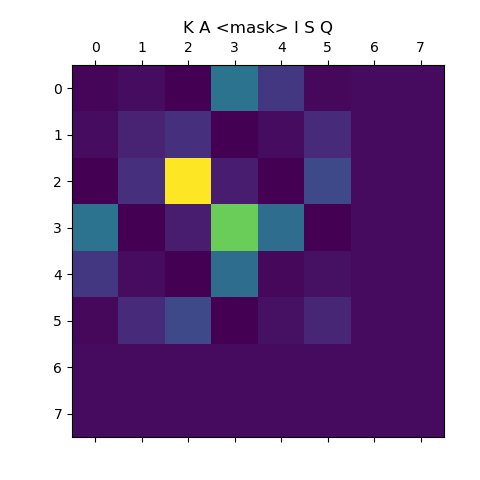
and the second test, to test ESM Fold:
import torch
import esm

model = esm.pretrained.esmfold_v1()
model = model.eval().cuda()

# Optionally, uncomment to set a chunk size for axial attention. This can help reduce memory.
# Lower sizes will have lower memory requirements at the cost of increased speed.
# model.set_chunk_size(128)

sequence = "MKTVRQERLKSIVRILERSKEPVSGAQLAEELSVSRQVIVQDIAYLRSLGYNIVATPRGYVLAGG"
# Multimer prediction can be done with chains separated by ':'

with torch.no_grad():
    output = model.infer_pdb(sequence)

with open("result.pdb", "w") as f:
    f.write(output)

import biotite.structure.io as bsio
struct = bsio.load_structure("result.pdb", extra_fields=["b_factor"])
print(struct.b_factor.mean())  # this will be the pLDDT
# 88.3
gave
(esmfold-env) [lookitsme@r5u15n1 openfold]$ python3 test.py
88.28930830039526
ProteinMPNN🔎
[lookitsme@r7u03n2 contrib]$ git clone https://github.com/dauparas/ProteinMPNN.git
[lookitsme@r7u03n2 contrib]$ cd ProteinMPNN
[lookitsme@r7u03n2 ProteinMPNN]$ micromamba create --prefix=$PWD/env/ProteinMPNN python=3.7
[lookitsme@r7u03n2 ProteinMPNN]$ micromamba activate $PWD/$ProteinMPNN/env/ProteinMPNN
(ProteinMPNN) [lookitsme@r7u03n2 ProteinMPNN]$ micromamba install -c "nvidia/label/cuda-11.3.1" cuda-toolkit
(ProteinMPNN) [lookitsme@r7u03n2 ProteinMPNN]$ micromamba install pytorch::pytorch=1.12.*
(ProteinMPNN) [lookitsme@r7u03n2 mpnn_example]$ micromamba install numpy
(ProteinMPNN) [lookitsme@r7u03n2 mpnn_example]$ micromamba install "mkl=2022.0"
To note, the mkl installation was required to fix
ImportError: /contrib/ProteinMPNN/env/ProteinMPNN/lib/python3.7/site-packages/torch/lib/libtorch_cpu.so: undefined symbol: iJIT_NotifyEvent
To test:
#!/bin/bash

micromamba activate mlfold

folder_with_pdbs="/contrib/ProteinMPNN/inputs/PDB_monomers/pdbs/"

output_dir="/xdisk/lookitsme/TICKETS/mpnn_example/output"

path_for_parsed_chains=$output_dir"/parsed_pdbs.jsonl"

python /contrib/ProteinMPNN/helper_scripts/parse_multiple_chains.py --input_path=$folder_with_pdbs --output_path=$path_for_parsed_chains

python /contrib/ProteinMPNN/protein_mpnn_run.py \
        --jsonl_path $path_for_parsed_chains \
        --out_folder $output_dir \
        --num_seq_per_target 2 \
        --sampling_temp "0.1" \
        --seed 37 \
        --batch_size 1
RFDiffusion🔎
This particular install had the issue of the historical versions of PyTorch specified in the environment requirements pulling the CPU-only versions.
https://github.com/RosettaCommons/RFdiffusion
git clone https://github.com/RosettaCommons/RFdiffusion.git
cd RFdiffusion
mkdir models && cd models
wget http://files.ipd.uw.edu/pub/RFdiffusion/6f5902ac237024bdd0c176cb93063dc4/Base_ckpt.pt
wget http://files.ipd.uw.edu/pub/RFdiffusion/e29311f6f1bf1af907f9ef9f44b8328b/Complex_base_ckpt.pt
wget http://files.ipd.uw.edu/pub/RFdiffusion/60f09a193fb5e5ccdc4980417708dbab/Complex_Fold_base_ckpt.pt
wget http://files.ipd.uw.edu/pub/RFdiffusion/74f51cfb8b440f50d70878e05361d8f0/InpaintSeq_ckpt.pt
wget http://files.ipd.uw.edu/pub/RFdiffusion/76d00716416567174cdb7ca96e208296/InpaintSeq_Fold_ckpt.pt
wget http://files.ipd.uw.edu/pub/RFdiffusion/5532d2e1f3a4738decd58b19d633b3c3/ActiveSite_ckpt.pt
wget http://files.ipd.uw.edu/pub/RFdiffusion/12fc204edeae5b57713c5ad7dcb97d39/Base_epoch8_ckpt.pt
wget http://files.ipd.uw.edu/pub/RFdiffusion/f572d396fae9206628714fb2ce00f72e/Complex_beta_ckpt.pt
wget http://files.ipd.uw.edu/pub/RFdiffusion/1befcb9b28e2f778f53d47f18b7597fa/RF_structure_prediction_weights.pt
cd ..
micromamba env create -f env/SE3nv.yml --prefix=$PWD/env/SE3nv
micromamba activate $PWD/env/SE3nv
cd env/SE3Transformer
pip install --no-cache-dir -r requirements.txt
python setup.py install
cd ../..
pip install -e .
Then, to patch the pytorch issues:
(SE3nv) [lookitsme@r7u25n1 RFdiffusion]$ python -c "import torch; print(torch.__version__); print(torch.version.cuda); print(torch.cuda.is_available())"
1.9.1.post3
None
False
(SE3nv) [lookitsme@r7u25n1 RFdiffusion]$ python -m pip uninstall -y torch torchvision torchaudio
Found existing installation: torch 1.9.1.post3
Uninstalling torch-1.9.1.post3:
  Successfully uninstalled torch-1.9.1.post3
Found existing installation: torchvision 0.15.2a0
Uninstalling torchvision-0.15.2a0:
  Successfully uninstalled torchvision-0.15.2a0
Found existing installation: torchaudio 0.9.0a0+a85b239
Uninstalling torchaudio-0.9.0a0+a85b239:
  Successfully uninstalled torchaudio-0.9.0a0+a85b239
(SE3nv) [lookitsme@r7u25n1 RFdiffusion]$ micromamba remove pytorch torchvision torchaudio
(SE3nv) [lookitsme@r7u25n1 RFdiffusion]$ pip install \
    torch==1.9.1+cu111 \
    torchvision==0.10.1+cu111 \
    torchaudio==0.9.1 \
    -f https://download.pytorch.org/whl/torch_stable.html
then, to finish:
(SE3nv) [lookitsme@r7u03n2 RFdiffusion]$ tar -xvf examples/ppi_scaffolds_subset.tar.gz -C examples/
(SE3nv) [lookitsme@r7u03n2 RFdiffusion]$ ln -s $PWD/config $PWD/env/SE3nv/config
EMSoft🔎
git clone --recursive https://github.com/EMsoft-org/EMsoftSuperbuild.git
export SDK_DIR=$PWD/EMsoft_SDK
mkdir Debug && cd Debug
cmake -DEMsoft_SDK=$SDK_DIR -DCMAKE_BUILD_TYPE=Debug ..
make -j
mkdir ../Release && cd ../Release
cmake -DEMsoft_SDK=$SDK_DIR -DCMAKE_BUILD_TYPE=Release ..
cd ../..
git clone --recursive https://github.com/EMsoft-org/EMsoftData.git
export DATADIR=$PWD/EMsoftData
git clone --recursive https://github.com/EMsoft-org/EMsoft.git
cd EMsoft
mkdir EMsoftBuild
cd EMsoftBuild/
mkdir Release && cd Release
module load cuda12
cmake -DCMAKE_BUILD_TYPE=Release -DEMsoft_SDK=$SDK_DIR -DOpenCL_INCLUDE_DIR=/opt/ohpc/pub/apps/cuda12/12.5/targets/x86_64-linux/include -DOpenCL_LIBRARY=/opt/ohpc/pub/apps/cuda12/12.5/targets/x86_64-linux/lib/libOpenCL.so -DEMsoftData_Dir=$DATADIR ../../
make -j
mkdir ../Debug && cd ../Debug
cmake -DCMAKE_BUILD_TYPE=Debug -DEMsoft_SDK=$SDK_DIR -DOpenCL_INCLUDE_DIR=/opt/ohpc/pub/apps/cuda12/12.5/targets/x86_64-linux/include -DOpenCL_LIBRARY=/opt/ohpc/pub/apps/cuda12/12.5/targets/x86_64-linux/lib/libOpenCL.so -DEMsoftData_Dir=$DATADIR ../../
Intel NCO🔎
module purge
module load intel
module load phdf5 netcdf
module load libaec antlr gsl
tar xvzvf 5.3.1.tar.gz
cd nco-5.3.1/
export CC=$(which icx)
export CXX=$(which icpx)
export CPPFLAGS="-I/usr/include/udunits2 $CPPFLAGS"
./configure --enable-gsl --enable-udunits2 --includedir=/usr/include/udunits2 --prefix=/opt/ohpc/admin/UAbuild/nco-intel/INSTALL
make -j4
Apptainer Recipes🔎
AddaxAI🔎
Bootstrap: docker
From: ubuntu:24.04

%post
  apt update -y
  apt install build-essential zlib1g-dev libncurses5-dev libgdbm-dev libnss3-dev libssl-dev libreadline-dev libffi-dev libsqlite3-dev wget libbz2-dev git -y
  apt-get update && \
  apt-get install -y libgl1 libglib2.0-0
  wget https://petervanlunteren.github.io/AddaxAI/install_files/linux/install.command
  sed -i 's/\bsudo\b//g' install.command
  chmod +x install.command
  mkdir ~/Desktop
  ./install.command